
After signing into Mapistry, you will be directed to the Sites Dashboard, where you can manage all your sites in one location.
To the far left is the Navigation Bar, where you can navigate between the Map Dashboard, the Site Dashboard, and Settings. The left-hand column has a drop-down list of the facilities you can access by clicking on their names. Simply click on the site name to open the drop list.
Below the drop-down menu are the Tasks Dashboard, Logs Dashboard, Records, Users, and Site Details.
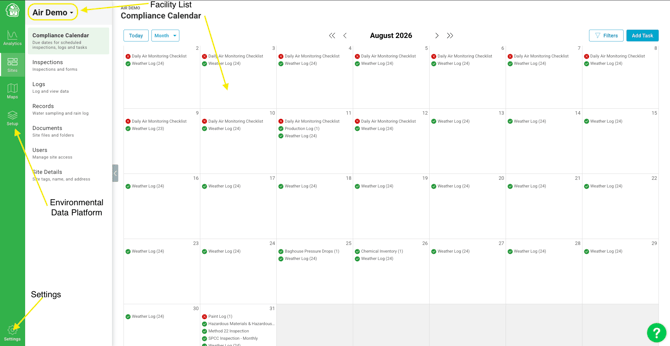
The Compliance Calendar
The Compliance Calendar is a calendar view that shows all compliance activities on your site - Tasks, Inspections, and Log Events - in one place. You can switch between Month, Week, and List views, and filter by event type, assignee, or completion status to focus on what matters most. At a glance, you can see what's overdue, completed, or coming up in the future. For more information about the Compliance Calendar, click here.
Environmental Data Platform
The 'Data Setup' icon will direct you to the Environmental Data Platform, where you can view, edit and create Logs and Resources. For more information about the Environmental Data Platform, click here.
Facility List
The Facility List on the left contains all sites you can access. You may switch between sites by clicking the dropdown menu and selecting the desired facility. The name of the selected facility will appear at the top of the page.
Tasks Page
The Tasks Dashboard is the section that displays key items regarding your environmental compliance at the desired facility. This includes the Compliance Calendar, routine inspections/forms, tasks, and record-keeping of historical forms.
Logs Page
The Logs Dashboard is where you can find, view, and edit all your site's logs. For more information about this dashboard, click here.
Records
The Records section is where you can find your site's documentation and historical water results. This includes site plans (such as SWPPP and SPCC Plans), Stormwater and Wastewater sampling results, Lab Reports, and other relevant documentation. For more information about the records section, click here.
Documents
The Documents section is Mapistry's folder system and document repository for keeping environmental files organized and accessible. Documents can be Organization managed - one shared set of files (like SDS sheets, SOPs, and policies) visible across every site, editable only by Organization Admins - or Site managed, where each site controls its own folders and files. When viewing a site's Documents page, both the site's own documents and any Organization-managed folders appear together. For more information about the Documents section, click here.
Users Module
The Users Module is the section where you can view who has access to a site, add users, change user notifications, or remove users. If you would like more information about the user's module, please click here.
Site Details
This is where you can view and edit information about your site. This includes the site name, address, sic codes, and site tags used for analytics.
Maps
The Maps icon will direct you to your sitemaps. Your sitemaps can be manipulated to include whatever you would like, but in general, will usually have, at a minimum, what is required by your environmental compliance permits (Stormwater, SPCC plan, etc.). Click here for more information on this section.
End of Article
Support
If you have any questions or need further assistance, please e-mail help@mapistry.com.